A clearer business story
Turn complex information into a focused narrative that helps the audience understand the message and remember the key points.

Turn business ideas, data and complex information into clear, persuasive and professionally designed presentations.
Enquire NowOverview
Presentation design is not only about making slides look better. BrainADZ combines content structure, visual hierarchy, brand consistency, data visualization and editable slide systems to help teams explain ideas more clearly and present with greater confidence.
Enquire Now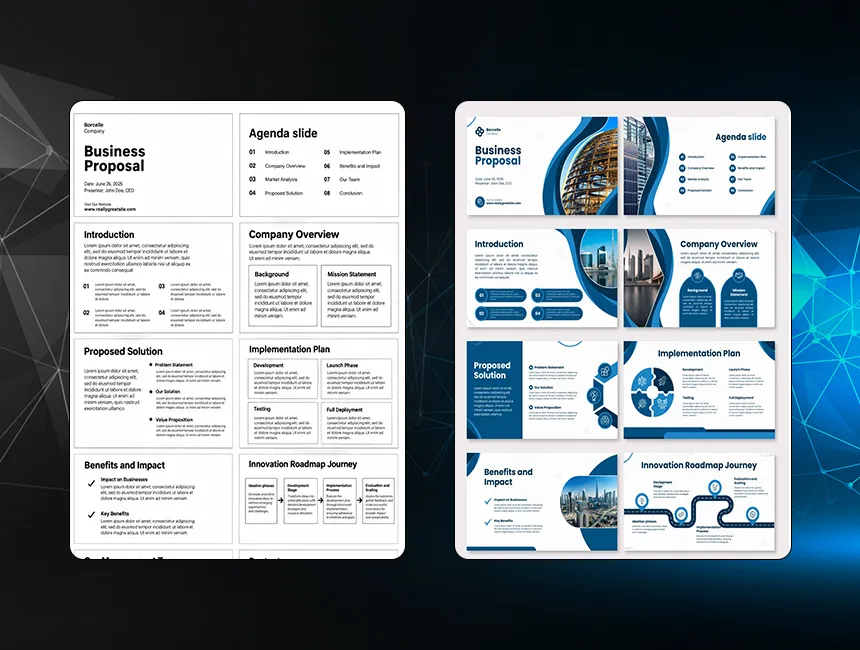
Turn complex information into a focused narrative that helps the audience understand the message and remember the key points.
Present ideas with polished layouts, consistent branding and professional slide design that supports confidence in the business.
Use hierarchy, pacing, imagery and visual contrast to keep meetings, pitches and presentations easier to follow.
Give teams editable templates and practical slide systems that reduce repeated design work across future presentations.
Presentation Types
Each deck is structured around its audience and purpose. The same slide style should not be used for an investor pitch, training module, sales proposal and keynote presentation.
Structure your offer around customer priorities, differentiators, proof and next steps for stronger sales conversations.
Present the opportunity, business model, traction and financial story with a clear investor-ready narrative.
Build a concise and credible company story for customers, partners, vendors, institutions and internal stakeholders.
Make business updates, reviews and planning discussions easier to understand through consistent information design.
Organize learning content into clear modules, examples and visual explanations that support attention and recall.
Create stage-ready slides with strong visual rhythm, reduced text and clear moments for audience emphasis.
Slide System
Strong decks use repeatable principles for narrative, hierarchy, layouts and brand expression. This keeps the presentation coherent while allowing important slides to receive custom treatment.
Define the opening, problem, evidence, solution, proof and closing sequence so every slide supports one connected business story.
Output
Deck storyline and flow
Organize headings, supporting copy, visuals and emphasis so audiences can scan and understand each slide quickly.
Output
Clear slide hierarchy
Translate brand colors, typography, imagery, iconography and graphic elements into a consistent presentation style.
Output
Presentation visual system
Create flexible layouts for text, comparisons, timelines, processes, statistics, team profiles, case studies and calls to action.
Output
Reusable layout family
Build editable master slides and practical usage rules that help teams create new slides without breaking the visual system.
Output
Master template toolkit
Data and Storytelling
Dense content, raw tables and internal terminology can make even strong ideas difficult to present. We reorganize the information so the audience can follow the logic and identify the key message.
We reduce repetition, group related information and create a logical sequence before visual styling begins.
Tables and raw figures are converted into charts, comparisons and visual summaries suited to the decision being discussed.
Complex systems, workflows and relationships are rebuilt as diagrams that make the information easier to explain.
Visual assets are selected and treated consistently so they support the message instead of appearing decorative or disconnected.
Presentation Standards
Each slide is designed around one primary idea so the audience is not forced to interpret competing messages.
Type sizes, contrast and spacing are checked for screens, meeting rooms and stage presentations instead of desktop viewing alone.
Colors, typography, image treatment and graphic devices remain coordinated across the complete deck.
Where editable delivery is required, layouts are built to support routine content changes by internal teams.
Design Process
The workflow separates content decisions, visual direction and slide production. This reduces rework and ensures the complete deck is built around an approved communication approach.
Enquire NowWe clarify who will view the presentation, what they already know, what decision is required and how the deck will be delivered.
Existing slides, notes, documents and data are reviewed to remove duplication, identify gaps and define a stronger narrative sequence.
We establish typography, color, imagery, graphic treatments and representative slide styles before extending the design across the deck.
Approved direction is applied slide by slide with custom layouts, charts, diagrams, image treatment and consistent hierarchy.
Feedback is consolidated and applied while checking numbers, labels, sequence, spacing, alignment and overall presentation rhythm.
The approved presentation is packaged in the agreed formats with fonts, linked assets, editable masters or supporting files where included.
Delivery and Handover
Delivery is planned around how the presentation will be used after approval. Editable decks, templates and supporting assets are included according to the agreed project scope.
The approved deck is organized for practical updates while protecting the intended hierarchy and layout system.
Reusable layouts can be prepared for teams that regularly create proposals, reports or internal presentations.
Approved icons, diagrams, charts and image treatments are organized for easier reuse and future deck expansion.
Additional versions can be prepared for sharing, presenting, printing or review according to the final use case.
Why BrainADZ
Design decisions are made around the audience, decision and communication objective rather than decoration alone.
Narrative structure, copy hierarchy and visual design are treated as connected parts of one presentation experience.
Important ideas, data and proof points receive purpose-built slides instead of being forced into repetitive templates.
Final files are organized so internal teams can present confidently and make routine updates more efficiently.
Selected Work

Sales Deck

Corporate Presentation

Business Report
FAQs
Practical details about content, formats, editable files, templates, timelines and presentation deliverables.
Enquire NowThe scope can include content review, deck restructuring, visual direction, slide design, chart and diagram redesign, image treatment, branded layouts, animation guidance, editable presentation delivery and reusable master slides. The exact mix depends on whether you need a new presentation, redesign or template system.
Yes. We can improve an existing deck by restructuring the flow, simplifying slides, strengthening hierarchy, updating visuals and applying a consistent design system. The original content can be retained, edited or reorganized according to the agreed scope.
Yes. We can organize content, improve slide headlines, reduce repetition and recommend a clearer narrative sequence. Full copywriting, detailed research or financial modeling can be scoped separately when the presentation requires substantial new content development.
Presentations can be designed for Microsoft PowerPoint, Google Slides or PDF delivery. Final format decisions depend on how your team edits, presents and shares the deck. Keynote compatibility or other specific requirements should be confirmed before production begins.
Editable delivery can be included. Text, charts, tables and approved layout components are organized for practical updates, although certain custom graphics or image-based treatments may remain as placed visual assets. Editable requirements are confirmed at the start of the project.
Yes. Raw data, tables, processes and frameworks can be converted into charts, diagrams, timelines, comparisons and infographic-style slides. Data accuracy remains dependent on the final information supplied and approved by your team.
Yes. We can create a branded master presentation with reusable cover, section, content, image, chart, comparison, case-study and closing layouts. Templates are built around the recurring presentation needs of your team rather than providing a large set of unnecessary slide variations.
Timelines depend on slide count, content readiness, complexity of charts and diagrams, number of stakeholders and review cycles. A visual redesign of finalized content usually moves faster than a presentation requiring restructuring, new copy and extensive data visualization.
Get a clear roadmap for campaigns, creative, website, SEO, and performance before you scale your next project.