Show products before the click
Present product imagery, pricing and merchant information to users while they compare relevant shopping results.

Promote ecommerce products through stronger Merchant Center data, structured retail campaigns and product-level optimisation connected to revenue quality.
Enquire NowGoogle Shopping overview
Google Shopping Ads use Merchant Center product information to promote products across eligible Google experiences. BrainADZ connects feed quality, campaign structure, bidding, budgets, stock and purchase data so product advertising remains commercially controlled.
Performance is reviewed by product and category—not only total account revenue. We identify which items attract demand, convert efficiently and support further investment after margin and inventory constraints.
Enquire Now
Present product imagery, pricing and merchant information to users while they compare relevant shopping results.
Strengthen titles, categories, identifiers and attributes that help Google match products with relevant demand.
Separate products by margin, category, stock, priority and performance so budget follows commercial opportunity.
Connect campaign spend with purchases, order value, product mix, new customers and profitability context.
Retail campaign model
Standard Shopping and Performance Max use Merchant Center inventory differently. The correct structure depends on account maturity, product economics and the level of control required.
Use product groups, bids, priorities and campaign controls when the retailer needs more direct visibility into product-level Shopping management.
Retail control and segmentation
Use Merchant Center product data with Google’s cross-channel campaign system to optimise toward conversion volume or value.
Cross-channel automation
Promote eligible in-store products and local availability when Merchant Center, store data and business operations support local retail journeys.
Online-to-store demand
Compare campaign structures, product groups, asset coverage, offers and bidding approaches using controlled commercial hypotheses.
Evidence-led growth
Merchant Center management
Merchant Center controls the product information and eligibility that power Shopping campaigns. Account and data issues can limit delivery before bidding is considered.
Account and store setup
We review business information, website verification, Google Ads linking, shipping, returns, taxes where applicable and product-source configuration.
Product source management
Product information can be supplied through ecommerce platform connections, files, sheets, APIs or supported automated sources depending on the catalogue and technical setup.
Diagnostics and policy readiness
Merchant Center diagnostics, disapprovals, warnings, destination eligibility and policy-related product issues are reviewed continuously.
Promotions and merchant programmes
Promotions, sale pricing, shipping offers and other Merchant Center programmes are aligned with real store terms and campaign economics.

Product feed optimisation
Shopping campaigns rely on product attributes rather than conventional keyword targeting. Feed quality directly affects relevance, eligibility and product-level reporting.
Titles are structured around product identity, important attributes, brand and variant information without adding misleading promotional language.
Descriptions and structured attributes communicate material, features, use, condition, identifiers, variants and other product facts.
Primary and additional images are reviewed for clarity, product visibility, consistency and policy compliance across the catalogue.
Price, sale price, availability, currency, delivery and destination data should match the live shopping experience.
Shopping campaign management
Campaign structure should reflect inventory, margins, product demand and conversion data rather than treating every item as equally valuable.
Product and category segmentation
Products are segmented by category, brand, margin, price, stock, seasonality, best-seller status and strategic priority.
Standard Shopping management
Standard Shopping campaigns are structured around inventory targets, priorities, product groups, bids and negative-keyword insights.
Performance Max for retail
Retail Performance Max campaigns are organised around product groups, asset groups, audience signals, conversion values and commercial goals.
Bidding and budget strategy
Budgets and bidding targets are set around purchase volume, revenue, margin, stock, seasonality and the amount of reliable data available.
Promotions and pricing strategy
Sale periods, merchant promotions, price drops, bundles and shipping offers are planned around stock, margin and customer demand.
Purchase and customer measurement
Purchase events, conversion value, average order value, new-customer performance and available profitability signals are reviewed.
Retail business models
Catalogue size, price, seasonality and physical-store operations change how product data and campaigns should be organised.
Use product labels, categories and automation to manage thousands of products without losing commercial segmentation.
Use strong product data, high-quality imagery and value-led measurement for lower-volume, higher-value purchases.
Prepare feeds, stock, promotions and budgets ahead of demand peaks and reduce spend as availability changes.
Coordinate online inventory, eligible local product information and store-related goals across the retail programme.
Product optimisation controls
Feed health, product performance, stock and conversion quality are reviewed before budgets or targets are changed.
Enquire NowReview approved, limited, disapproved, out-of-stock and underperforming items before changing bids or budgets.
Use search terms, category demand, product reporting and competitive context to improve feed and campaign decisions.
Use labels and product groups to separate high-margin, priority, seasonal, clearance and low-stock inventory.
Validate purchase values, new-customer signals, refunds and product economics before scaling automated bidding.
Product data, price, availability, identifiers and landing-page consistency are corrected before bidding changes are expected to solve delivery problems.
Campaign investment is redirected when priority products cannot support additional demand or when availability is unreliable.
Account performance is reviewed by product, category, label and campaign instead of relying only on total ROAS.
Performance Max and Smart Bidding inputs are improved before targets and budgets are changed repeatedly.
Google Shopping process
Merchant Center, feeds, campaigns, purchase tracking and product economics remain connected through one retail growth roadmap.
We confirm product range, margins, stock, average order value, markets, Merchant Center health, conversion tracking and business priorities.
Titles, descriptions, attributes, identifiers, images, pricing, availability, destinations and policy issues are reviewed.
Products are labelled and segmented according to category, value, margin, stock, seasonality and growth priority.
Standard Shopping or Performance Max campaigns, listing groups, assets, budgets, bidding and conversion goals are configured.
Product eligibility, spend, search demand, asset coverage, purchase events, values and stock changes are monitored after launch.
Feeds, product groups, bids, budgets, promotions and assets are refined using product, customer and revenue-quality evidence.
Shopping campaign reporting
Reporting explains catalogue health, product-level demand, commercial quality and where retail budgets should move next.
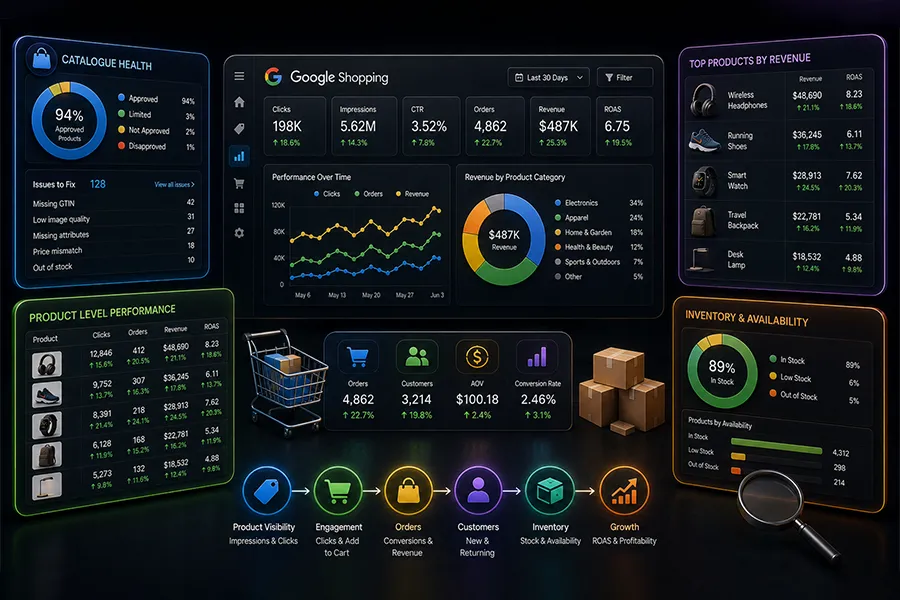
Understand catalogue coverage, product eligibility and the issues preventing items from serving correctly.
Identify which products and categories generate useful demand, revenue and conversion value.
Review whether campaign growth supports healthy order value, customer acquisition and product economics.
Show where spend should be expanded, protected, reduced or redirected according to inventory and performance.
Google Shopping Ads FAQs
Understand Merchant Center, feeds, Standard Shopping, Performance Max, custom labels, local inventory and retail measurement.
Enquire NowThe service can include Merchant Center setup or review, product feed optimisation, Standard Shopping, Performance Max retail campaigns, product segmentation, bidding, budgets, promotions, purchase tracking, optimisation and reporting.
Yes. Retailers need product information in Google Merchant Center and must link the relevant Merchant Center and Google Ads accounts before running Shopping or retail Performance Max campaigns.
Standard Shopping provides more direct campaign, product-group and bidding control within Shopping inventory. Performance Max uses Merchant Center products with broader Google channel automation and optimises using goals, assets, audience inputs and conversion data.
Shopping ads primarily use Merchant Center product attributes and campaign settings rather than keyword targeting. Search terms and negative keyword controls can still provide important insight and control depending on campaign type.
Yes. Feed work can include titles, descriptions, categories, product types, identifiers, variants, images, price, availability and custom labels, together with Merchant Center diagnostics and policy issues.
Custom labels are optional feed attributes that retailers can use to group products by business-defined categories such as margin, season, bestseller status, price band or clearance. They support campaign segmentation and reporting.
Eligible retailers can use local inventory data and supported campaign setups to promote products available in physical stores. Merchant Center, store information, inventory data and policy requirements must all be configured correctly.
Measurement can include product impressions, clicks, cost, orders, revenue, conversion value, ROAS, average order value, new customers, stock, product-group contribution and available profitability context.
Campaigns can begin generating product traffic and orders after approval and launch, but stable performance requires enough demand and conversion data. Results depend on product competitiveness, pricing, feed quality, stock, website experience, budget and measurement.
No responsible Shopping Ads provider can guarantee fixed results because performance depends on demand, competition, price, stock, margin, feed quality, website conversion, tracking and budget. We provide transparent optimisation around agreed commercial goals.

Get a clear roadmap for campaigns, creative, website, SEO, and performance before you scale your next project.